Score Cast scoring, done right
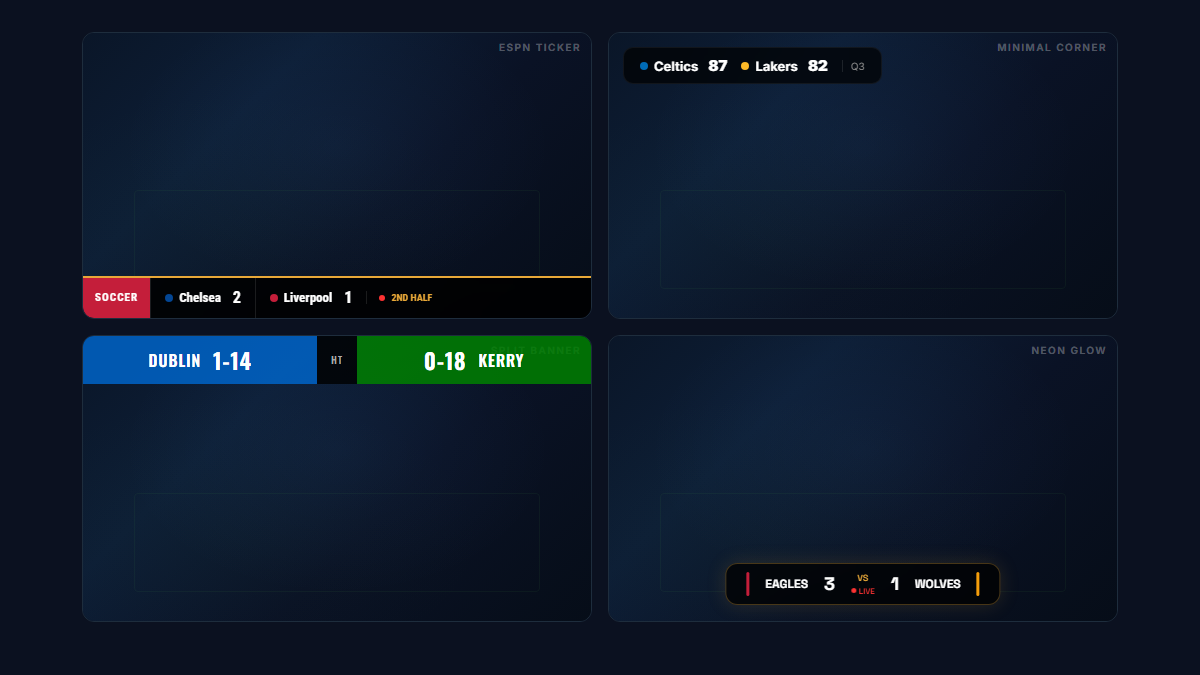
Pick from 8 overlay styles — ESPN-style ticker, minimal corner, split banner, L-bar, neon glow and more — each with your team names, colours and a live indicator.
- 8 transparent overlay styles (ESPN ticker, minimal, split banner, L-bar, neon, capsule, bar, full)
- Works as a browser source in OBS, Streamlabs, vMix and YouTube Live
- Real-time updates — control from your phone while streaming
- Team names, colours and live indicators
- Works with all 22 sports
- Separate display link for an on-site TV at the same time
From setup to scoring in 60 seconds
Create a game
Pick your sport and get a short game code.
Score from your phone
Control the score on your phone — the screen updates instantly.
Add the overlay to OBS in five steps
This is the full OBS Studio setup. Streamlabs Desktop, vMix, Prism Live and XSplit use the same browser-source idea; only the menu names change.
- 1
Create the game and copy the overlay link
Open the app, create a game for your sport and open the share sheet. Copy the overlay link. It looks like score-cast.net/overlay/ABC-1234 and it is different from the TV display link.
- 2
Add a Browser source in OBS
In OBS, click + under Sources, choose Browser, and name it "Scoreboard". Paste the overlay link into the URL field.
- 3
Set the size to your canvas
Set Width to 1920 and Height to 1080 (or whatever your canvas is). The overlay draws itself in the chosen corner and leaves the rest transparent, so there is no cropping to do.
- 4
Pick a style and a corner
Add ?style=espn-ticker (or minimal, capsule, lbar, neon, split-banner) and &position=top-left (or top-right, bottom-left, bottom-right) to the end of the link. Change it any time; the source reloads on its own.
- 5
Untick "Shutdown source when not visible"
Leave "Refresh browser when scene becomes active" unticked too. Then score from your phone. The overlay updates within a second, in every scene the source is in.
The overlay styles
Every style is a URL parameter, so you can switch between them without touching the source. Add ?style= and the name below to the overlay link.
| Style | Looks like | Best for |
|---|---|---|
espn-ticker | Full-width broadcast ticker with team blocks | Field sports, anything shot wide |
minimal | Small corner card, names and score only | Talking-head and esports streams |
split-banner | Two team colours meeting in the middle | Club colours, derby matches |
capsule | Rounded pill in one corner | Vertical and mobile streams |
lbar | Score runs down one side and along the bottom | Multi-camera productions |
neon | Glowing outline on a dark edge | Esports, darts, snooker, night events |
bar | Plain horizontal bar (the default) | Anything, when in doubt |
Perfect for
Frequently asked questions
Is the scoreboard free?
Yes — you can watch and spectate for free, and start scoring in under a minute. Paid plans for creating and controlling games start at $4.99/month.
Do I need to install anything?
No. Score Cast runs in any web browser on your phone, TV, laptop or tablet. There is nothing to download.
How do the phone and the TV stay in sync?
Every game has a short code. Open the display on the big screen and the controller on your phone using the same code — scores sync in real time over the web.
Can I use it for live streaming?
Yes. Score Cast includes 8 transparent overlay styles that drop into OBS, Streamlabs, vMix or YouTube Live as a browser source, with live team colours and indicators.
Is the scoreboard overlay free?
Watching and spectating are free, and you can try the overlay on a free game. Ongoing game creation and control is on paid plans from $4.99/month — there is no separate overlay plugin to buy.
Which streaming software does it work with?
Anything with a browser source: OBS Studio, Streamlabs Desktop, vMix, Prism Live Studio, XSplit, Wirecast, Ecamm Live and StreamYard. Paste the overlay URL as a browser or web source with a transparent background.
Can I put the scoreboard on a video recording, not just a live stream?
Yes. Record in OBS or vMix with the overlay as a source and the scoreboard is baked into the file. For a match you have already recorded, play it back in OBS as a media source, add the overlay and score along as you record.
Why does my overlay show a black background in OBS?
You have pasted the display link instead of the overlay link. The display page is built for TVs and has a solid background. The overlay link contains /overlay/ and is transparent. Swap the URL in the browser source and the background disappears.
Does the score keep updating when I switch scenes?
Yes, as long as "Shutdown source when not visible" is unticked on the browser source. If it is ticked, OBS pauses the page when the scene is inactive and the score catches up when you switch back.